What Resolution Do You Need for Colour Separation?
DPI confusion causes more rejected artwork than almost anything else in prepress. Here is a clear breakdown of what resolution means for colour separation, and exactly what to send.
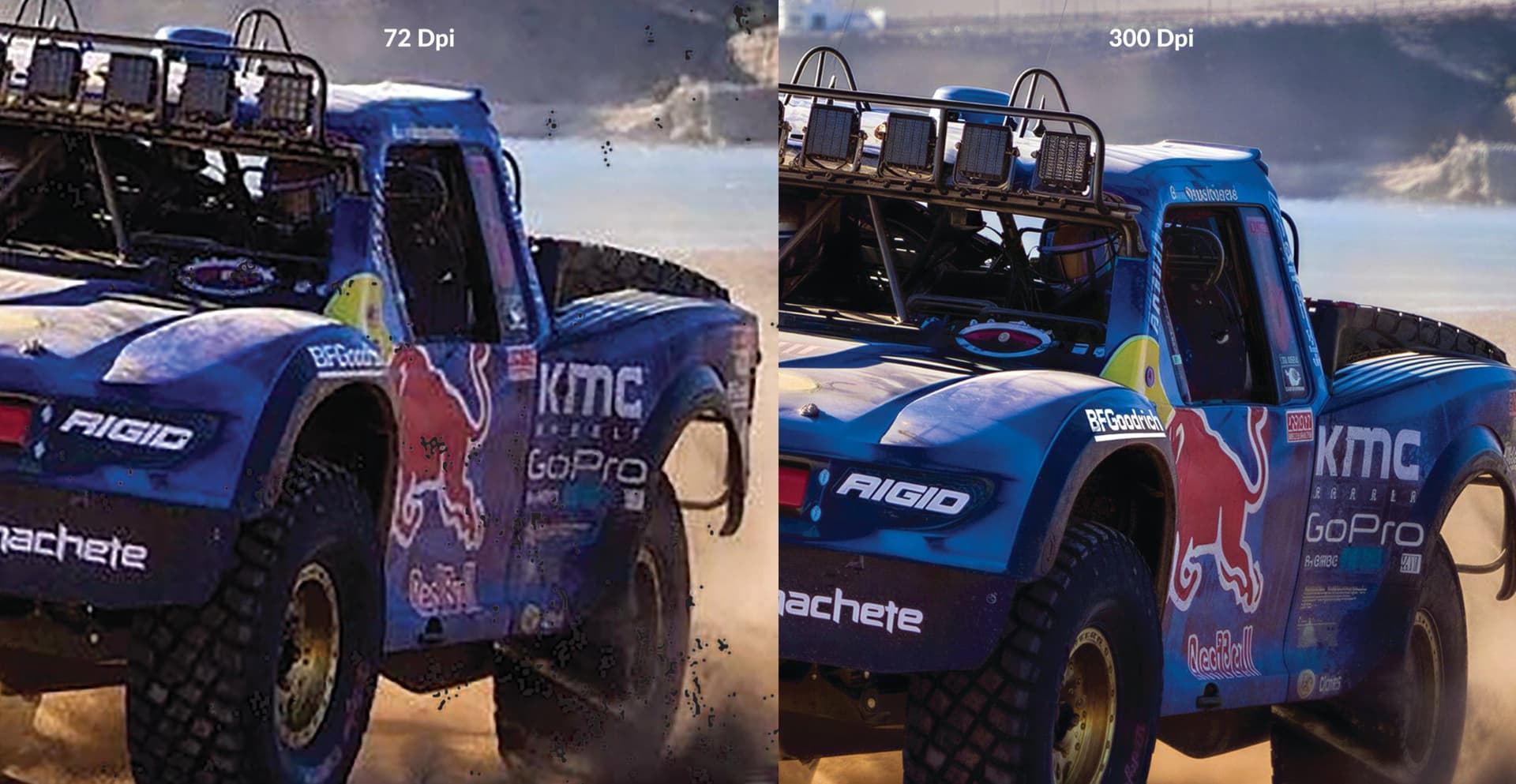
You receive a logo from a client. It looks fine on screen. You send it for separation and get it back with a note: resolution too low. Here is what that actually means, and what to do about it.
What does DPI mean in printing?
DPI stands for dots per inch. It measures how many ink dots a printer or press lays down within a single inch. Higher DPI means more detail and smoother gradients. In screen printing, the equivalent measure is LPI (lines per inch), which describes the halftone frequency. The DPI of your source artwork sets the ceiling on what the separation can reproduce.
If the artwork does not contain enough detail at the right size, the separation cannot create it.
Is 300 DPI always enough?
300 DPI at print size is the standard for most print work, and it holds for photographic CMYK and simulated process separations. For vector artwork, DPI is irrelevant because vectors are resolution-independent and scale without loss.
Where 300 DPI falls short is in fine halftone work. If you are separating at a high screen frequency (65 LPI and above), halftone dots become small enough that a 300 DPI raster image starts to show stairstepping on diagonal edges. In those cases, 400–600 DPI at print size gives the separation cleaner edges and tighter halftone cells.
The short answer: 300 DPI at print size is the minimum. 400–600 DPI is better for high-frequency halftone separations.
What happens when artwork is too low-res?
A common scenario: a client sends a PNG that is 72 DPI, downloaded from a website. At print size (say, 30 cm wide), that image has roughly one quarter of the pixels needed for a clean separation.
The pixelation shows up in the separation file. Soft edges become jagged. Halftone dots do not blend smoothly. Text loses sharpness. These defects transfer directly to film or RIP output and print exactly as they appear in the file.
Upsampling in Photoshop adds pixels but does not add real detail. It blurs edges and produces a soft, washed-out result. Scaling up a low-res original is not a fix; the detail was never there.
Does file format affect resolution?
Vector formats (AI, EPS, SVG, PDF with live vectors) are resolution-independent. A logo drawn in Illustrator can be exported at any size without quality loss. This is why vector source files are always preferred for separation work.
Raster formats (PSD, TIFF, PNG, JPG) are resolution-dependent. The DPI and pixel dimensions are fixed at the time of creation. A 72 DPI PNG cannot become a 300 DPI file by changing the metadata in File Info; the pixels are not there.
When you send raster artwork, what matters is the DPI at the intended print size, not the number displayed in the file properties.
What is the difference between image resolution and output resolution?
These two terms are often used interchangeably, but they describe different things.
Image resolution is the pixel density of your source artwork, measured in DPI or PPI. This is set when the file is created and cannot be genuinely improved after the fact.
Output resolution is the DPI your printer or RIP uses when imaging the film, screen, or transfer. A modern inkjet RIP may output at 1200–2400 DPI. That high output DPI does not rescue a 72 DPI source file; it only means the low-res pixels are reproduced with precision.
High output resolution cannot compensate for low source resolution. Both need to be correct.
What is LPI and how does it relate to DPI?
LPI (lines per inch) is the halftone screen frequency used in screen printing. It determines how fine the halftone dot pattern is. Common values range from 45–55 LPI for standard plastisol work to 55–65 LPI for fine detail or water-based inks.
A general prepress rule: source artwork should be at least 1.5 to 2 times the output LPI, expressed in DPI at print size. For 55 LPI output, that means 83–110 DPI is technically sufficient for the halftone. But 300 DPI is still recommended for clean edges on type and solid shapes.
This is also why a 72 DPI web image sometimes appears acceptable in a coarse 45 LPI separation: the halftone dots are large enough to mask pixel edges. At 65 LPI, those same edges become visible in the dot pattern and carry through to print.
What should you send for colour separation?
- Vector artwork (AI, EPS, PDF with live art): always preferred, no resolution limit.
- Raster artwork (PSD, TIFF, PNG): minimum 300 DPI at the intended print size; 400–600 DPI for fine halftone work.
- JPEG: acceptable if high-quality (low compression setting), 300 DPI minimum. Avoid heavily compressed files.
- Screenshots and web exports: not suitable for separation. Send the original source file.
If you are unsure, send the file anyway. We check resolution before starting work and flag issues within 1–2 hours of receiving an enquiry.
Can a low-res file be fixed before separation?
Sometimes. If the artwork is a logo or type-based design, it can often be rebuilt as a clean vector through our artwork rebuild service. The rebuild produces a sharp, scalable file that separates cleanly at any size.
If the artwork is a photographic print or a complex raster image, a rebuild is not always possible. We will tell you honestly what can and cannot be recovered from the file you have.
To send artwork for a resolution check or a separation quote, use the quote form. We respond within 1–2 hours on working days.
Ready to Get Started?
Submit your artwork and we'll review it before you commit to anything.
Submit Your Artwork